Scores
Scores are reusable criteria for evaluating AI model outputs. You define them once, then use them in Evaluations and Experiments. See Prompts, Models & Scores for the underlying concepts.
Prerequisites
- Prompts (optional) — For LLM-as-judge scores, create a prompt that evaluates outputs. Scores without an evaluator prompt are manual; you enter results in the evaluation detail view. RAGAS scores do not use an evaluator prompt (see RAGAS metrics below).
How scores get their values: manual vs LLM-as-judge
When you run an evaluation, each score needs a value per row. How that value is produced depends on whether the score has an Evaluator Prompt:
| Mode | How it works | When to use |
|---|---|---|
| Manual | No evaluator prompt is attached. You (or a reviewer) enter score results in the evaluation detail view for each row. | When you have human reviewers, existing labels, or scripted results you upload or enter. |
| LLM-as-judge | An Evaluator Prompt is attached to the score. When the evaluation runs, an LLM uses that prompt to evaluate each row’s inputs/outputs and returns a score value. | When you want automatic, repeatable judging (e.g. "Is this response helpful? 1–5") using a model. |
- Creating a score: In the score form, Evaluator Prompt is optional. Leave it empty for manual; select a prompt for LLM-as-judge.
- In evaluations: Manual scores show up in the evaluation’s Detailed tab where you can enter or edit values. LLM-as-judge scores are computed when you run the evaluation (and may be re-run).
- RAGAS is different: RAGAS metrics are produced by the RAGAS scoring framework, not by an evaluator prompt or manual entry. See RAGAS metrics.
Scoring types in detail
Every score has a Scoring Type that defines the kind of value it holds and how statistics are computed.
Numeric
- Values: Continuous numbers (e.g. 0–10, 0–1). No scale options.
- Use case: Ratings, similarity scores, or any continuous metric.
- In evaluations: You or the LLM returns a number. Statistics include mean, median, standard deviation, confidence interval, and scored count.
Ordinal
- Values: Ordered categories with ranks (e.g. Poor < Fair < Good). You define scale options with a label and a rank for each.
- Use case: Likert-style scales, quality tiers, or any ordered set of labels.
- In evaluations: You or the LLM returns one of the scale options. Statistics include median, mode, percentiles, entropy, and scored count. You can also configure:
- Acceptable Set — which categories count as "passing" for pass rate.
- Threshold Rank — rank below which results are treated as "bad" for tail mass below.
Nominal
- Values: Unordered categories (e.g. Red, Blue, Green). You define scale options with labels (no rank).
- Use case: Classification labels, tags, or any set of non-ordered categories.
- In evaluations: You or the LLM returns one of the scale options. Statistics include mode, entropy, number of categories, and scored count.
RAGAS metrics
RAGAS is a scoring framework. Scores with type RAGAS represent metrics produced by that framework (e.g. faithfulness, answer relevancy), not custom criteria you define. See the RAGAS documentation for the framework and available metrics.
- How they’re produced: When an evaluation includes RAGAS scores, the system uses the RAGAS framework to compute those metrics for each row. No evaluator prompt is used; you do not enter values manually. The evaluation must have a RAGAS model configuration (set when creating or editing the evaluation).
- In the UI: RAGAS scores are treated like numeric scores for statistics and charts (mean, median, std dev, confidence interval, etc.).
If you need custom criteria or an LLM judge, use Numeric, Ordinal, or Nominal with or without an Evaluator Prompt instead of RAGAS. For more on the framework and its metrics, see the RAGAS documentation.
Scores list
From Scores in the sidebar, you see all scores for the project.
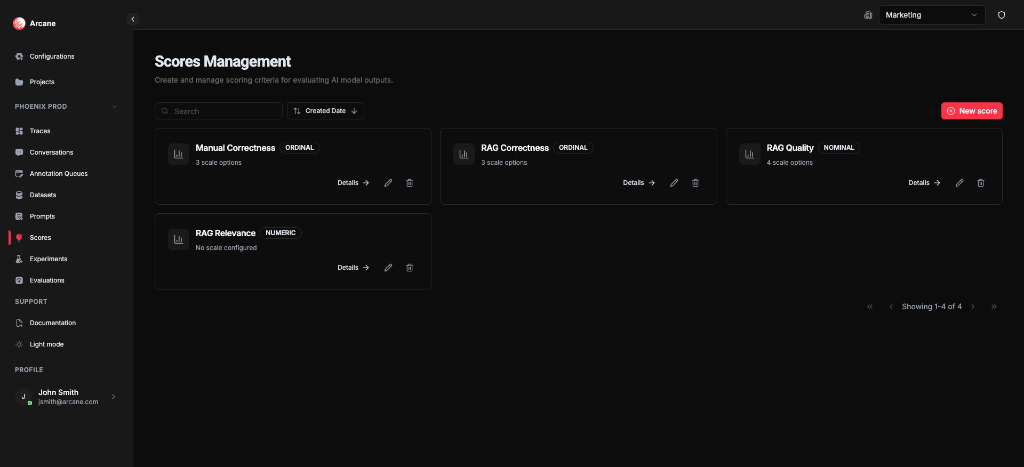
Search and sort
| Control | What it does |
|---|---|
| Search | Filter scores by name or description. |
| Sort | Sort by Name, Description, Scoring Type, or Created Date (ascending/descending). |
Score cards
Each score shows:
- Name and Scoring Type (Numeric, Ordinal, Nominal, or RAGAS)
- Scale info — e.g. "3 scale options" for Ordinal/Nominal, or "No scale configured" for Numeric; RAGAS scores show framework metric info
- Details — open the score detail dialog
- Edit — change the score configuration
- Delete — remove the score
New score
Click New score to create a score with name, type, and optional evaluator prompt.
Create score
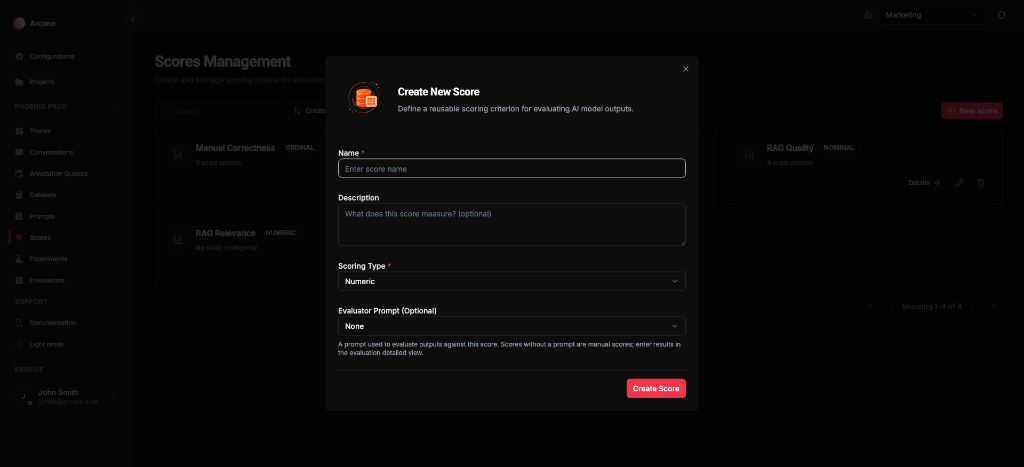
Basic info
| Field | What it does |
|---|---|
| Name | Required. Label for the score. |
| Description | Optional. Helper text for your team. |
Scoring type
| Type | What it does |
|---|---|
| Numeric | Continuous values (e.g. 0–10). No scale options. Values can be manual or from an evaluator prompt. |
| Ordinal | Ordered categories with ranks (e.g. Poor < Fair < Good). Add scale options with labels and ranks. Optional Ordinal Configuration for pass rate and tail mass. |
| Nominal | Unordered categories (e.g. Red, Blue, Green). Add scale options with labels. |
| RAGAS | Metrics from the RAGAS scoring framework. No scale options or evaluator prompt; values are computed by RAGAS when the evaluation runs. Requires a RAGAS model configuration on the evaluation. See RAGAS metrics above. |
Evaluator prompt
| Field | What it does |
|---|---|
| Evaluator Prompt (Optional) | For Numeric, Ordinal, or Nominal only. A prompt used to evaluate outputs against this score (LLM-as-judge). Leave empty for manual entry in the evaluation detail view. RAGAS scores do not use this field. |
Click Create Score to save.
Score detail
Click Details on a score card to view its configuration.
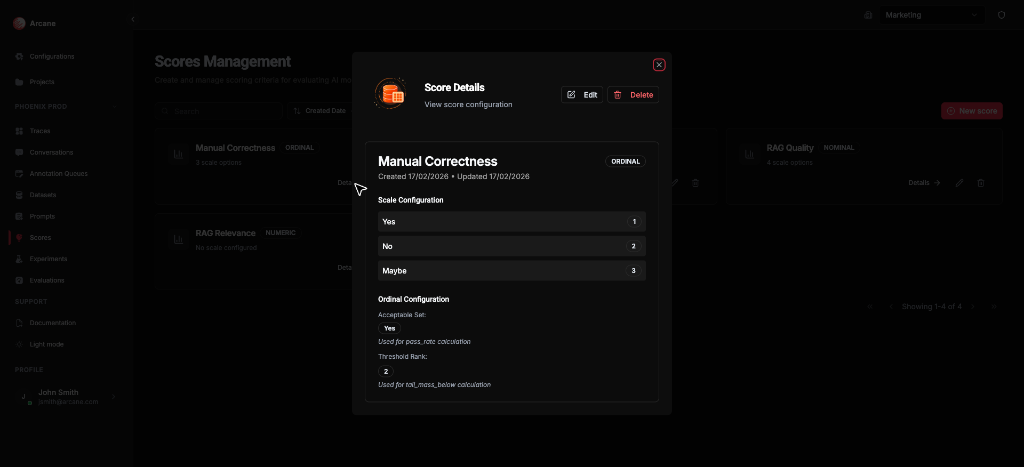
The detail dialog shows:
- Name, Scoring Type, and timestamps
- Scale Configuration — for Ordinal/Nominal, the options and their ranks
- Ordinal Configuration (Ordinal only) — Acceptable Set (for pass_rate) and Threshold Rank (for tail_mass_below)
Use Edit or Delete from the dialog, or Close to return to the list.
Edit score
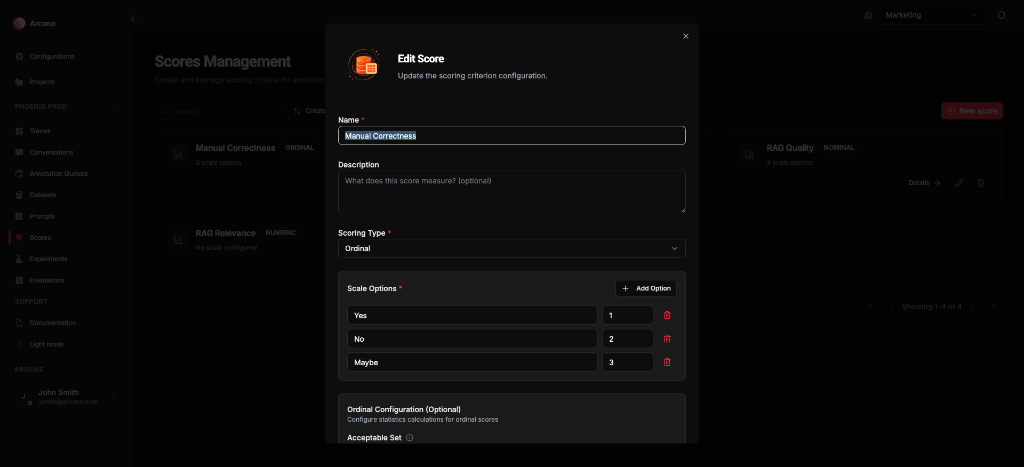
The Edit dialog lets you change:
| Section | What it does |
|---|---|
| Name / Description | Update the label and helper text. |
| Scoring Type | Change the type (affects scale options). |
| Scale Options | For Ordinal/Nominal: add, edit, or remove options. Each option has a label and (for Ordinal) a rank. |
| Ordinal Configuration | For Ordinal only: Acceptable Set (categories considered "passing" for pass_rate), Threshold Rank (rank below which results are "bad" for tail_mass_below). |
| Evaluator Prompt | Attach or remove a prompt for LLM-as-judge. |
Click Update Score to save.
When to use
- Define what "good" means — e.g. factual correctness, helpfulness, relevance.
- Reuse across evaluations — run the same score on different datasets.
- Compare variants in experiments — use shared scores to compare prompt/model combinations fairly.
- Manual vs LLM-as-judge — use manual scores when you enter results yourself in the evaluation detail view; attach an Evaluator Prompt for LLM-as-judge. Use RAGAS when you want metrics from the RAGAS framework (computed automatically, no prompt).
Related
- Prompts, Models & Scores — concepts.
- Evaluations — run scores on datasets or experiment results.
- Evaluation & Experimentation — overview.
- Prompts — create prompts for LLM-as-judge scores.