Audit
Audit logs track every change in your organization and projects: who did what, when, and to which resource. Use audit logs for compliance, debugging, and understanding changes over time.
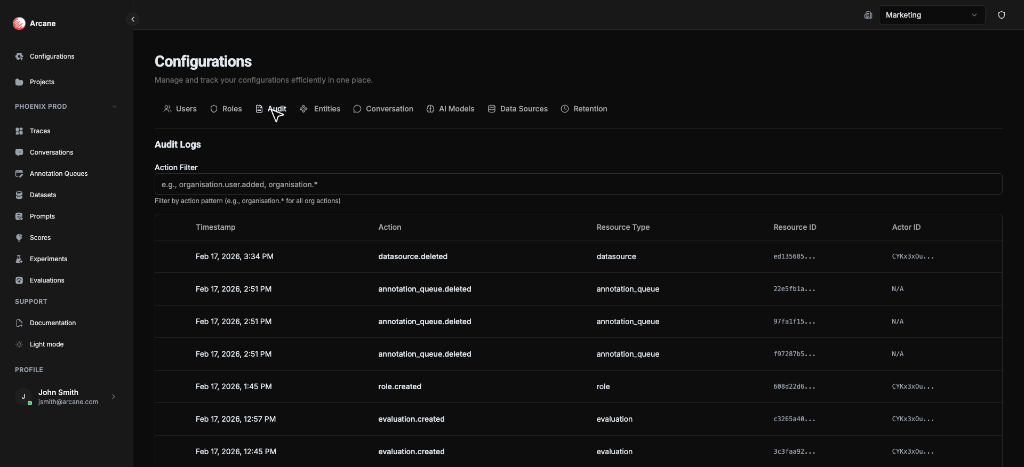
What it is
Audit logs provide a complete history of changes across your organization and projects. Every action—from creating a datasource to removing a user—is recorded with:
- Who performed the action (Actor ID)
- What action was performed (Action name)
- When it happened (Timestamp)
- Which resource was affected (Resource Type and Resource ID)
Where to find audit logs:
- Organization-level — Organisation Configuration → Audit tab
- Project-level — Manage Project → Audit tab
What you see
The Audit tab shows a table of audit events:
| Column | Description |
|---|---|
| Timestamp | When the action occurred (e.g., "Feb 17, 2026, 3:34 PM") |
| Action | The action name (e.g., datasource.deleted, entity.created) |
| Resource Type | Type of resource (e.g., datasource, entity, project) |
| Resource ID | ID of the affected resource (truncated; copy to get full ID) |
| Actor ID | User or system that performed the action (truncated; "N/A" if unknown) |
Features:
- Copy buttons — Hover a row or cell to see copy icons. Copy the full row as JSON or copy individual cells
- Action Filter — Filter by action pattern to focus on specific types of changes
Filtering audit logs
Use the Action Filter to narrow down audit logs by action pattern. Leave it empty to see the default scope (organization-level actions).
How patterns work
The filter uses pattern matching:
- Exact match —
datasource.deletedshows only that specific action - Wildcard —
organisation.*shows all organization actions - Resource prefix —
entity.*shows all entity create/update/delete actions
Common action patterns
| Pattern | What it shows |
|---|---|
organisation.* | All organization-level actions (default when filter is empty) |
organisation.created | Organization created |
organisation.updated | Organization updated |
organisation.deleted | Organization deleted |
organisation.user.* | All user-related actions |
organisation.user.added | User added to organization |
organisation.user.invited | User invited to organization |
organisation.user.removed | User removed from organization |
organisation.user.role.assigned | User role assigned at organization level |
organisation.retention.updated | Organization retention settings updated |
project.* | All project actions |
project.created | Project created |
project.updated | Project updated |
project.deleted | Project deleted |
project_member.* | All project membership changes |
project_member.added | Member added to project |
project_member.removed | Member removed from project |
project_role.* | All project role assignments |
project_role.assigned | Role assigned to project member |
project_role.removed | Role removed from project member |
project.retention.updated | Project retention settings updated |
datasource.* | All datasource actions |
datasource.created | Data source created |
datasource.updated | Data source updated |
datasource.deleted | Data source deleted |
entity.* | All entity actions |
entity.created | Entity created |
entity.updated | Entity updated |
entity.deleted | Entity deleted |
model_configuration.* | All model configuration actions |
model_configuration.created | Model configuration created |
model_configuration.updated | Model configuration updated |
model_configuration.deleted | Model configuration deleted |
conversation_configuration.* | All conversation configuration actions |
conversation_configuration.created | Conversation configuration created |
conversation_configuration.updated | Conversation configuration updated |
conversation_configuration.deleted | Conversation configuration deleted |
dataset.* | All dataset actions |
dataset.created | Dataset created |
dataset.updated | Dataset updated |
dataset.deleted | Dataset deleted |
score.* | All score actions |
score.created | Score created |
score.updated | Score updated |
score.deleted | Score deleted |
prompt.* | All prompt actions |
prompt.created | Prompt created |
prompt.version_created | Prompt version created |
prompt.updated | Prompt updated |
prompt.deleted | Prompt deleted |
prompt.version_promoted | Prompt version promoted |
experiment.* | All experiment actions |
experiment.created | Experiment created |
experiment.rerun | Experiment rerun |
experiment.deleted | Experiment deleted |
evaluation.* | All evaluation actions |
evaluation.created | Evaluation created |
evaluation.rerun | Evaluation rerun |
evaluation.deleted | Evaluation deleted |
role.* | All role actions |
role.created | Role created |
role.updated | Role updated |
role.deleted | Role deleted |
retention.deleted | Retention policy deleted (automatic deletion) |
instance_owner.* | All instance owner actions |
instance_owner.assigned | Instance owner assigned |
instance_owner.removed | Instance owner removed |
Tip: Use patterns like organisation.user.* to see all user-related changes, or project.* to focus on project-level activities.
What you can do
- Filter by action — Type a pattern in the Action Filter (e.g.,
datasource.*). Results update as you type - Copy entire row — Hover a row, click the copy icon on the left. Copies the full log entry as JSON
- Copy a cell — Hover a cell (Timestamp, Action, Resource Type, Resource ID, Actor ID), click the copy icon
When to use
- Compliance — Track who changed what and when for regulatory requirements
- Debugging — See why a resource was deleted or updated
- User activity — Filter by
organisation.user.*orproject_member.*to see user changes - Auditing — Review changes before a release or deployment
- Security — Monitor for unauthorized changes or suspicious activity
Prerequisites
- Organization access — You must be a member of the organization
- Appropriate permissions — Audit logs require Organisation Admin or Project Admin permissions
- Enterprise features — Organization-level audit logs require enterprise features
Related
- Managing Projects — Access project-level audit logs
- Organisation Configuration — Access organization-level audit logs
- RBAC — Learn about roles and permissions