Data Retention
Data retention controls how long data is kept before automatic deletion. Configure retention policies at different levels to manage storage costs and comply with data retention requirements.
You can configure retention at two levels:
- Organization-level — Set retention policies for audit logs
- Project-level — Set retention policies for evaluations and experiments
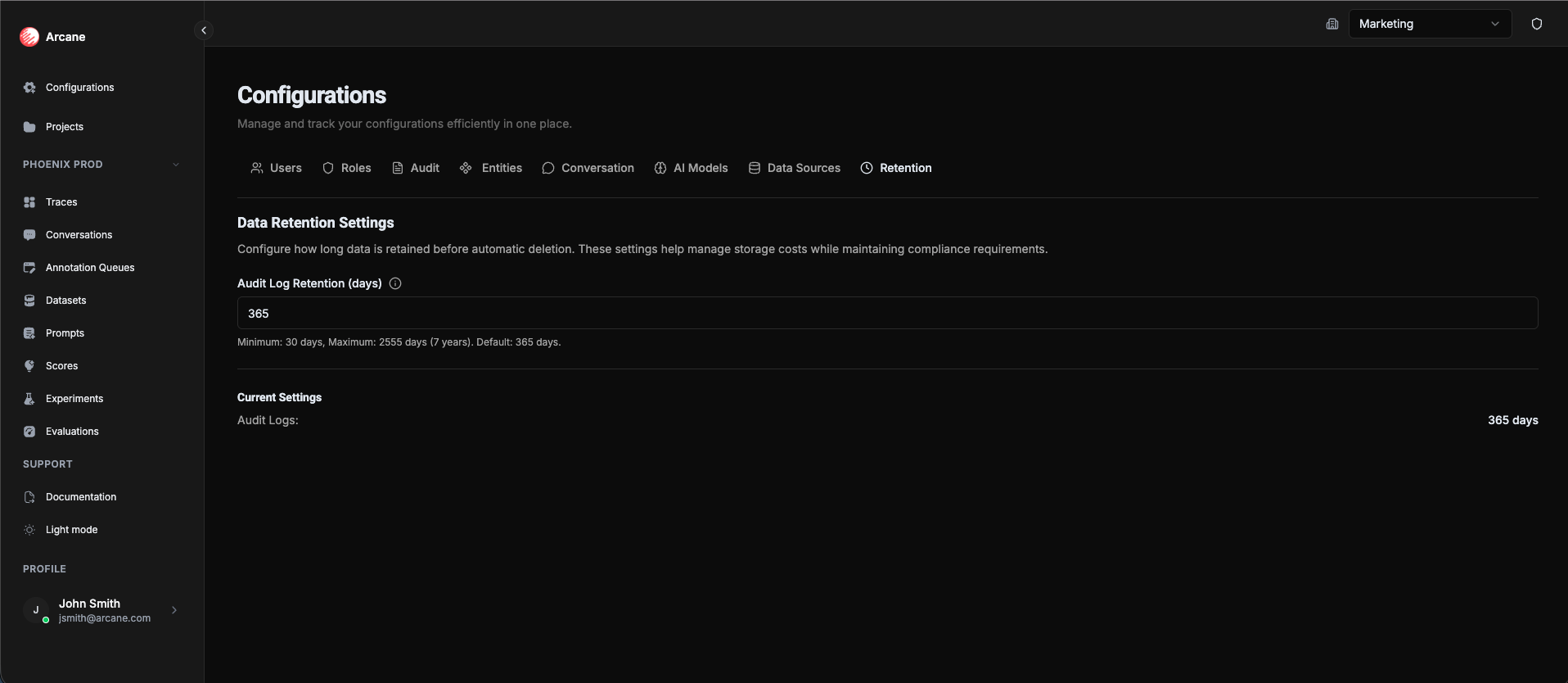
Organization-level retention settings (audit logs)
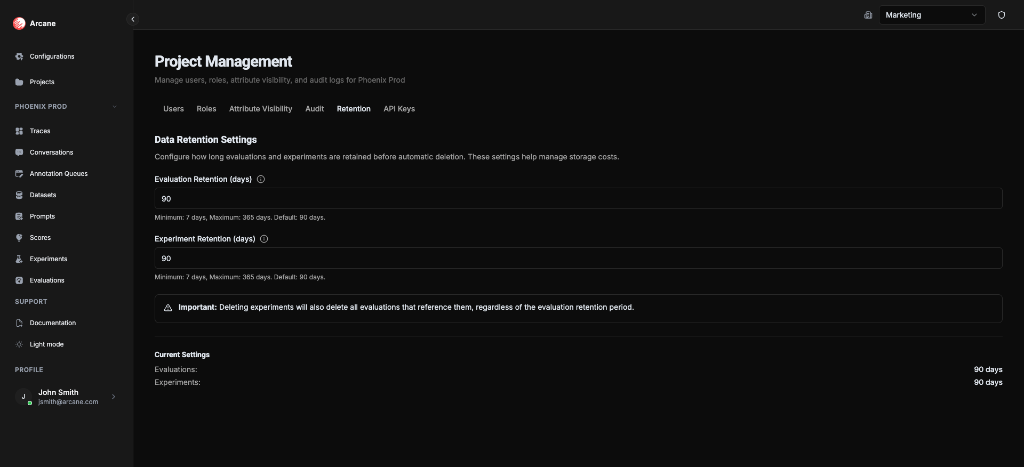
Project-level retention settings (evaluations & experiments)
What it is
Data retention policies automatically delete old data after a specified period. Different types of data have retention settings at different levels:
Organization-level retention:
- Audit logs — Organization and project audit log entries older than the retention period
Project-level retention:
- Evaluations — Evaluation results and data older than the retention period
- Experiments — Experiment configurations and results older than the retention period
Where to configure:
- Organization-level — Organisation Configuration → Retention tab
- Project-level — Manage Project → Retention tab
Important: When an experiment is deleted (either manually or by retention), all evaluations that reference it are also deleted, regardless of evaluation retention settings.
What you see
Organization-level retention
The Retention tab in Organisation Configuration shows:
| Setting | Description |
|---|---|
| Audit Log Retention (days) | How long audit logs are kept before automatic deletion |
Defaults:
- Minimum: 7 days
- Maximum: 365 days
- Default: 90 days
Project-level retention
The Retention tab in Manage Project shows:
| Setting | Description |
|---|---|
| Evaluation Retention (days) | How long evaluations are kept before automatic deletion |
| Experiment Retention (days) | How long experiments are kept before automatic deletion |
Defaults:
- Minimum: 7 days
- Maximum: 365 days
- Default: 90 days
Configuring retention
Organization-level retention (audit logs)
Set retention policies for audit logs:
- Go to Organisation Configuration → Retention tab
- Audit Log Retention — Enter the number of days to keep audit logs (7-365)
- Save — Audit logs older than this period will be automatically deleted
Tip: Set retention based on your compliance requirements. Some regulations require keeping audit logs for specific periods (e.g., 90 days, 1 year).
Project-level retention (evaluations & experiments)
Set retention policies for evaluations and experiments:
- Go to Manage Project → Retention tab
- Evaluation Retention — Enter the number of days to keep evaluations (7-365)
- Experiment Retention — Enter the number of days to keep experiments (7-365)
- Save — Data older than these periods will be automatically deleted
Tip: Set shorter retention periods for test projects or projects with high data volume to save storage costs. Use longer periods for production projects with important historical data.
How it works
- Automatic deletion — Data older than the retention period is automatically deleted
- Daily cleanup — Retention policies are checked daily
- No recovery — Deleted data cannot be recovered
- Experiment dependencies — Deleting an experiment also deletes all evaluations that reference it (project-level only)
Example (project-level):
- If Evaluation Retention is set to 90 days, evaluations older than 90 days are deleted
- If Experiment Retention is set to 60 days, experiments older than 60 days are deleted
- If an experiment is deleted, all its evaluations are deleted too, even if they're less than 90 days old
Example (organization-level):
- If Audit Log Retention is set to 180 days, audit log entries older than 180 days are deleted
Best practices
- Set appropriate periods — Balance storage costs with data needs
- Consider dependencies — Remember that deleting experiments also deletes their evaluations (project-level)
- Export important data — Export evaluations, experiments, and audit logs you want to keep before they're deleted
- Review regularly — Periodically review retention settings to ensure they're still appropriate
- Compliance — Set audit log retention based on regulatory requirements (organization-level)
- Test projects — Use shorter retention periods (7-30 days) for test projects
- Production projects — Use longer retention periods (90-365 days) for production projects
Examples
Organization-level: Audit log retention
Scenario: You need to keep audit logs for 180 days to comply with regulations.
- Go to Organisation Configuration → Retention tab
- Set Audit Log Retention to 180 days
- Save
Result: All audit log entries older than 180 days are automatically deleted.
Project-level: Test project with short retention
Scenario: You have a test project with frequent experiments and evaluations. You want to keep data for 30 days to save storage.
- Go to Manage Project → Retention tab
- Set Evaluation Retention to 30 days
- Set Experiment Retention to 30 days
- Save
Result: All evaluations and experiments older than 30 days are automatically deleted.
Project-level: Production project with long retention
Scenario: You have a production project with important historical data. You want to keep evaluations for 180 days and experiments for 365 days.
- Go to Manage Project → Retention tab
- Set Evaluation Retention to 180 days
- Set Experiment Retention to 365 days
- Save
Result: Evaluations are kept for 180 days, experiments for 365 days.
Important notes
- Minimum retention — You must keep data for at least 7 days
- No recovery — Deleted data cannot be recovered
- Experiment dependencies — Deleting experiments also deletes all their evaluations (project-level only)
- Separate settings — Organization-level retention (audit logs) and project-level retention (evaluations & experiments) are independent
Prerequisites
- Organization access — You must be a member of the organization
- Organization Admin role — Required for organization-level retention settings
- Project access — You must be a member of the project
- Project Admin role — Required for project-level retention settings
Related
- Managing Projects — Access project-level retention
- Organisation Configuration — Access organization-level retention
- Evaluations — Learn about evaluations
- Experiments — Learn about experiments
- Audit — Learn about audit logs