Overview
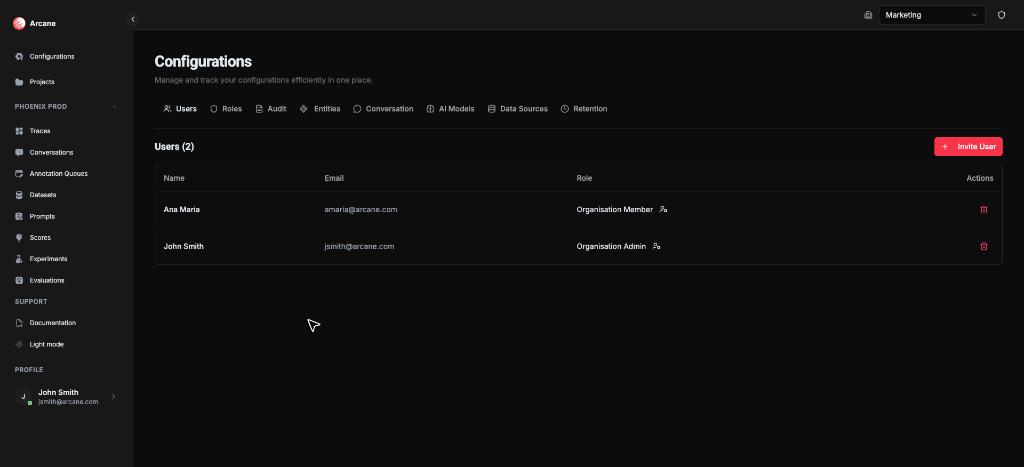
The Organisation Configuration hub is where you set up your organization before using Traces, Conversations, Evaluations, and other features. Configure datasources, entities, models, users, and more—all in one place.
What it is
Organisation Configuration gives you control over how Arcane connects to your data and how it displays information. Use it to:
- Connect to your traces — Set up datasources so Arcane can read your trace data
- Map business entities to telemetry — Create entities to map your business concepts (models, tools, agents) to telemetry data. Entities enable entity detection, highlighting, message matching, and many other features that depend on identifying your AI components
- Register AI models — Register AI LLM models from providers like OpenAI, Anthropic to be used in prompts, scores, experiments and evaluations
- Manage your team — Invite users and set up roles and permissions
- Track changes — Review audit logs to see who changed what
Tabs
The configuration hub has eight tabs, each focused on a specific area:
| Tab | Purpose | Learn More |
|---|---|---|
| Data Sources | Connect to Tempo, Jaeger, ClickHouse, or Custom API | Data Sources |
| Entities | Map your business entities to telemetry concepts. Enables entity detection, highlighting, message matching, and many features that depend on identifying your AI components | Entities |
| Conversation | Define how conversations are stitched together | See Traces, Spans & Conversations |
| AI Models | Register AI LLM models from providers like OpenAI, Anthropic to be used in prompts, scores, experiments and evaluations | Model Configurations |
| Users | Invite users and manage organization membership | Managing Users |
| Roles | Create custom roles and manage permissions | See RBAC |
| Audit | Review organization-level change history | See Audit |
| Retention | Configure data retention settings | See Data Retention |
Note: Some tabs (Users, Roles, Audit, Retention) may be hidden if you don't have permission. Roles and Audit require enterprise features.
Recommended setup order
When setting up a new organization, follow this order:
- Data Sources — Connect to where your traces are stored so Arcane can read them
- Entities — Map your business entities to telemetry concepts. This enables entity detection, highlighting, message matching, and many features that depend on identifying your AI components
- Conversation — Define how sessions are grouped for the Conversations page
- AI Models — Register AI LLM models from providers like OpenAI, Anthropic to be used in prompts, scores, experiments and evaluations
- Users & Roles — Invite teammates and set up permissions
- Audit — Confirm change logging is working (enterprise)
- Retention — Adjust data retention if needed
Prerequisites
- Organization access — You must be a member of the organization
- Appropriate permissions — Some tabs require specific permissions (e.g., Users, Roles, Audit)
Related
- Data Sources — Connect to trace backends
- Entities — Map business entities to telemetry concepts, enabling entity detection, highlighting, and message matching
- Model Configurations — Register AI models
- Managing Users — Invite and manage organization members
- RBAC — Roles and permissions overview
- Project Configuration — Configure project-level settings