Managing Users
The Users tab lets you invite people to your organization, change their roles, and remove them when they no longer need access. Organization members can access projects and resources within that organization.
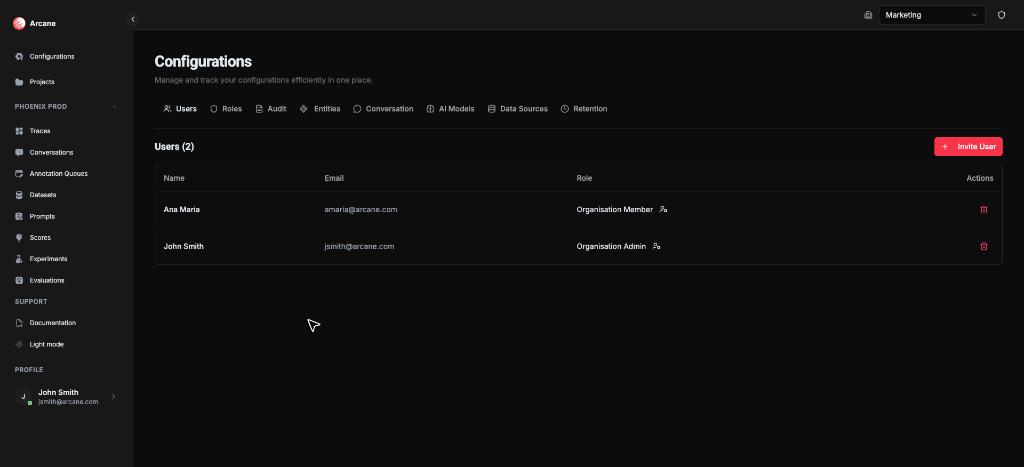
What you see
The Users tab shows a table of all organization members:
| Column | Description |
|---|---|
| Name | User's display name |
| User's email address | |
| Role | Their organization role (dropdown to change) |
| Actions | Remove button (trash icon) to remove the user |
Inviting a user
Click Invite User to add someone to your organization.
Invite User dialog
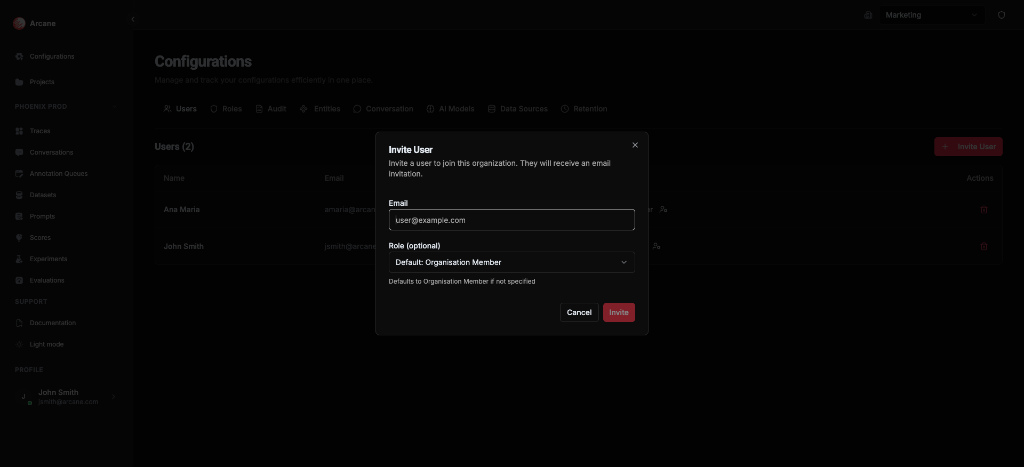
| Field | Required | Description |
|---|---|---|
| Yes | The user's email address (e.g., user@example.com) | |
| Role (optional) | No | Choose their organization role from the dropdown. Defaults to "Organisation Member" if not specified |
Buttons: Cancel closes without saving. Invite sends the invitation.
Tip: The user will receive an email invitation. They need to accept it before they can access the organization.
Changing a user's role
Click the role dropdown next to a user's name to change their organization role. Available roles:
- Organisation Admin — Full access to organization settings and all projects
- Organisation Member — Can access projects they're added to
- Project Admin — Admin access to specific projects
- Member — Standard project access
- Viewer — Read-only access
Note: Role changes take effect immediately. Make sure you're granting the right level of access.
Removing a user
Click the trash icon next to a user to remove them from the organization. This:
- Removes their access to the organization and all its projects
- Does not delete their user account (they may still belong to other organizations)
- Cannot be undone — you'll need to invite them again if they need access back
Warning: Removing a user immediately revokes their access. Make sure they've finished any important work before removing them.
When to use
- Onboarding — Invite new team members when they join your organization
- Access changes — Update roles when someone's responsibilities change
- Offboarding — Remove users when they leave the team or no longer need access
- Security — Regularly review who has access and remove users who shouldn't
Related
- RBAC — Learn about roles and permissions
- Project Configuration — Manage users at the project level
- Organisation Configuration — Overview of all organization configuration options